
Coolibah -- Digital Scrapbooking1.7 - App Store
You'll be able to see results in few seconds.
Publisher Description
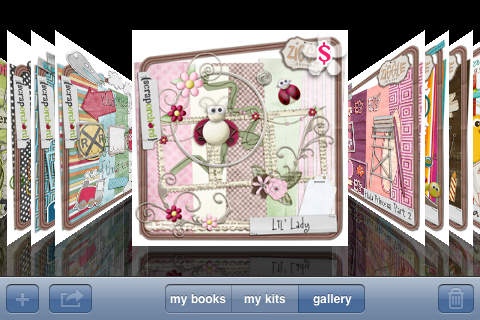
Scrapbook your photos anywhere, anytime... without the mess!
------------------------------------------
Featured in Apple's "What's Hot" section in 59 different countries!
#1 app in the Lifestyles category in 4 countries.
Top 100 app in the Lifestyles category in 85 countries!
Featured in Beatweek magazine as a top fifty essential iPad app!
------------------------------------------
Step #1 - Install Coolibah
Step #2 - Go to the Gallery (in-app store)
Step #3 - Download kits
Step #4 - Create a new book
Step #5 - Be creative and have fun!
The Gallery includes 17+ FREE kits for you to download!
Choose from over 600+ premium kits.. all .99 each!
Hundreds of different themes. Too many to list here.
**Please allow the Gallery to fully load the first time you visit it. It will take a few minutes. But the wait will be worth it! We are working on an update that will eliminate the load time for first time visitors.**
Coolibah features include:
-create your own layouts using unlimited photos, elements, frames and text
-move, size, and rotate photos, elements and frames anywhere on your layout
-control element overlap with forward and back controls
-DROP SHADOWS
-edit layouts after saving
-slideshow mode
-hide kits that are not in use
-50+ built-in fonts to choose from
-SmartPalette color selector for text
-layout export for sharing online, texting and emailing
-Unlimited Albums
-Unlimited Pages
-In App sharing for Facebook, Twitter, Tumblr
-Email pages to friends and family without leaving the app!
------------------------------------------
Kits available from talented designers:
-Just So Scrappy
-Crazy 4 Monograms
-Amy Teets Designs
-Tracie Stroud
-Pink Flamingo Designs
-Jacque Larsen
-Laura Burger
-Studio Flergs
-Christy Skaggs
-Creations by Rachael
-Crisdam Designs
-Dana Frantz
-Heather Manning
-K-Joi studios
-Snickerdoodle Designs
-Lyndsay Riches
-Matahati Designs
-mleCard
-SuzyQ Scrap
-Ziggle Designs
If you're like me, you've already collected a few hundred photos on your iPhone that you're going to "do something" with someday. Let's face it, when you finally manage to get a few minutes of quality time at your computer, scrapbooking your iPhone photos is probably pretty far down on your list. With Coolibah you can scrapbook anywhere, anytime! Install it today and you can start filling those "lost" minutes spent waiting for your kids at the doctor's office, the dentist's office, at gymnastics, baseball, or soccer with something that's fun and productive.
------------------------------------------
Coolibah works best with high-resolution iPhone photos. You do have the ability to use photos imported through iTunes. But please be aware that iTunes resizes photos during the import process, making them very small. They will show up small on a Coolibah page because of this.
You can bypass iTunes to get high resolution photos on your device.
* Email the photo to yourself > open it on your device > save to your device
* Upload to a photo hosting website (flickr, photobucket.. etc.) > access your account on your device > save photo to your device
------------------------------------------
Please visit our blog for tutorials and FAQs http://blog.coolibah.me
Facebook: @Coolibahme
Twitter: @coolibahme
******************************************
Video tutorials available at http://www.youtube.com/user/coolibahme
******************************************
We are very active developers and love to take the time to answer your questions and help you with anything you need.
Please contact us through a support ticket at http://blog.coolibah.me/support before leaving a review here if you have an issue.
-- We can't help you if you just leave a review. --
Requires iOS 3.1.3 or later. Compatible with iPhone, iPad, and iPod touch.
About Coolibah -- Digital Scrapbooking
The company that develops Coolibah -- Digital Scrapbooking is Scott Means Consulting, LLC. The latest version released by its developer is 1.7.
To install Coolibah -- Digital Scrapbooking on your iOS device, just click the green Continue To App button above to start the installation process. The app is listed on our website since 2009-11-16 and was downloaded 0 times. We have already checked if the download link is safe, however for your own protection we recommend that you scan the downloaded app with your antivirus. Your antivirus may detect the Coolibah -- Digital Scrapbooking as malware if the download link is broken.
How to install Coolibah -- Digital Scrapbooking on your iOS device:
- Click on the Continue To App button on our website. This will redirect you to the App Store.
- Once the Coolibah -- Digital Scrapbooking is shown in the iTunes listing of your iOS device, you can start its download and installation. Tap on the GET button to the right of the app to start downloading it.
- If you are not logged-in the iOS appstore app, you'll be prompted for your your Apple ID and/or password.
- After Coolibah -- Digital Scrapbooking is downloaded, you'll see an INSTALL button to the right. Tap on it to start the actual installation of the iOS app.
- Once installation is finished you can tap on the OPEN button to start it. Its icon will also be added to your device home screen.
Program Details
System requirements
Download information
Pricing
Version History
version 1.7
posted on 2009-11-16
Disclaimer
Official App Store Link
We do not host Coolibah -- Digital Scrapbooking on our servers. We did not scan it for viruses, adware, spyware or other type of malware. This app is hosted by Apple and passed their terms and conditions to be listed there. We recommend caution when installing it.
The App Store link for Coolibah -- Digital Scrapbooking is provided to you by apps112.com without any warranties, representations or guarantees of any kind, so access it at your own risk.
If you have questions regarding this particular app contact the publisher directly. For questions about the functionalities of apps112.com contact us.
